Vibe coding games: what breaks when thirty phones join at once
The six ways a room of phones breaks a vibe-coded game, how to test each one by hand, and what a kart race built in Studio ran into
· Updated
A vibe-coded game usually has one player: the person who made it, at the laptop it was made on. A game for a room has thirty players at once, each on a different phone, and a projector at the back. That is where vibe-coded games break.
This page names the six things that break, in the words Decka Studio's checks use for them. Each comes with a way to test it by hand, whatever tool wrote your game. Then comes Kart Rally, a kart race built in Studio, and what it took to hold up with a full room.
What vibe coding is good at
Andrej Karpathy named it in a post on X on 2 February 2025. He wrote: "There's a new kind of coding I call 'vibe coding', where you fully give in to the vibes, embrace exponentials, and forget that the code even exists."
The same post describes the loop. He asks for changes in plain words, pastes error messages back "with no comment", and reports that "usually that fixes it". He no longer reads the diffs.
That loop is fast for anything you can see. You run the game, notice the jump feels floaty, say so, and run it again. Karpathy's own verdict was that it is "not too bad for throwaway weekend projects", and a game you play alone at your desk is close to one.
The loop has one blind spot for games: it fixes what you see. At your desk you see one screen. In a room, the bug is on the twenty-ninth phone, in somebody else's hand, and nobody pastes you the error.
Six things that break when a whole room plays
Decka Studio checks each of these on every new version of a game before it saves it. The headings below are the lines on its check card. Under each is what breaks, how to test it by hand, and what Studio does.
Playing it to the end with test players
A game can start well and still stall in round three. A phase waits for an answer that never comes, a timer never fires, or the final screen never shows. A test that stops once the first round works will not catch any of it.
Test it by hand. Open the game in four or five browser windows, join each one as a player, and play every round to the final screen. Then play again and let one player stop answering halfway.
What Studio does. Thirty test players join and play it to the end, or as many as the game allows if that is fewer. Studio then replays the same run on a fresh copy of the rules, because rules that answer differently after a restart would not finish in a real room either.
Fitting every phone, small to large
Your laptop shows the phone screen at whatever size you dragged the window to. A room brings small phones and large ones. A word that fits on one runs off the edge of another, and a button made for a mouse is too small for a thumb.
The W3C's accessibility guidelines set two useful bars. Content should reflow at a width of 320 CSS pixels without scrolling sideways. Their strictest level asks for touch targets of at least 44 by 44 CSS pixels.
Test it by hand. Open the phone screen in your browser's device mode at the narrowest phone it offers and at the largest. Play a round on each, and press every button with your thumb on a real phone.
What Studio does. It opens the phone screens in a real browser at 320 by 568 pixels and at 430 by 932. It looks at up to eight moments of a test run, among them the end of a phase, when a screen holds the most. A button smaller than 44 pixels either way fails, and so does phone text under 12 pixels.
Reading it at projector size
The big screen gets built on a laptop at arm's length. In a room it is read from the back row, often on a projector. Text that looked fine at your desk turns into a smudge, and anything below the bottom edge is gone, because a projector cannot scroll.
Test it by hand. Put the big screen on a TV or a projector at the resolution the room will use, and stand at the back. Without one, set a browser window to 1920 by 1080 and step back from it.
What Studio does. It lays the big screen out at 1920 by 1080 pixels in a real browser and fails anything that runs past an edge. Text under 16 pixels fails too, or under 14 for capitals.
Dropping a phone and bringing it back
Phones lock, switch to another app and drop off the venue's Wi-Fi, all in the middle of a round. A game that knows its players only by their open connection loses them. The player who comes back finds a new name and no score.
Test it by hand. Mid-round, lock one phone for a minute, or switch on airplane mode and off again. The player should come back as the same player, with their score, on the screen the game is on now.
What Studio does. In the run its test players played to the end, it drops a phone at the last moment the game was live and brings it back. The check passes only if that phone can rejoin.
Running it with a full room
Some costs grow faster than the room. If every phone is sent every player's position, ten times the players means a hundred times the data. A game that runs smoothly with eight players can crawl with a few hundred, and a test with eight never shows it.
Test it by hand. You won't find a few hundred people for a test, so write players instead. A short script, or your AI, can open simulated players that join and press buttons. Watch how long each step takes as their number goes up.
What Studio does. It plays the game with a full room of test players. That is as many as one activity holds on the biggest plan you can buy, or fewer if the game allows fewer. The pricing page lists each plan's room size.
Running it with AI unavailable
Many vibe-coded games call an AI mid-game: to judge an answer, write a prompt or play a character. That call can time out, be refused or hit a rate limit. A game that waits for it hangs with the whole room watching.
Test it by hand. Switch the AI off and play a full round, by removing the key or blocking the request. Every step that asks an AI needs a fallback that keeps the game moving.
What Studio does. It plays one more run with every AI request declined, and the game has to keep working without it. A game that uses no AI passes with "Uses no AI, so nothing to fall back from".
A worked example: Kart Rally, a race for a whole room
Kart Rally is a 3D kart race built in Decka Studio. Each phone drives one kart, with a steering wheel, a Drift button and a camera behind the kart. The big screen shows the whole track from above.
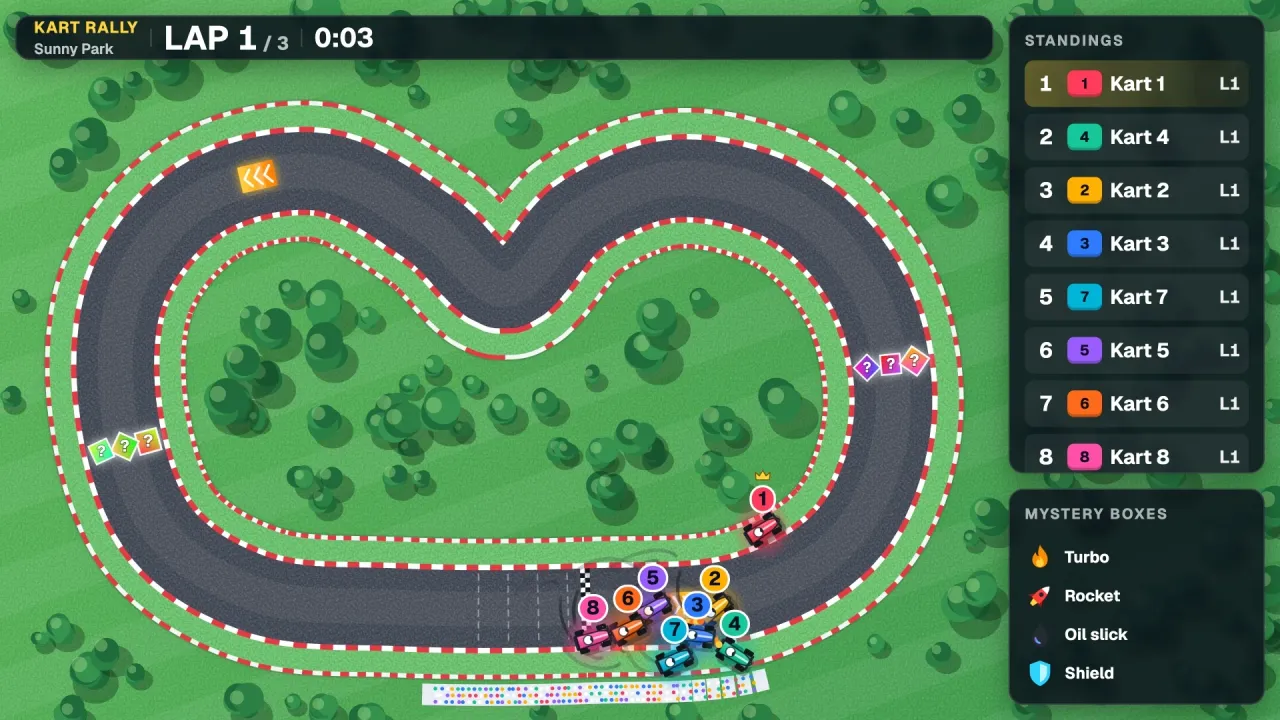
Kart Rally, built in Decka Studio, in a test run with Studio's test players.
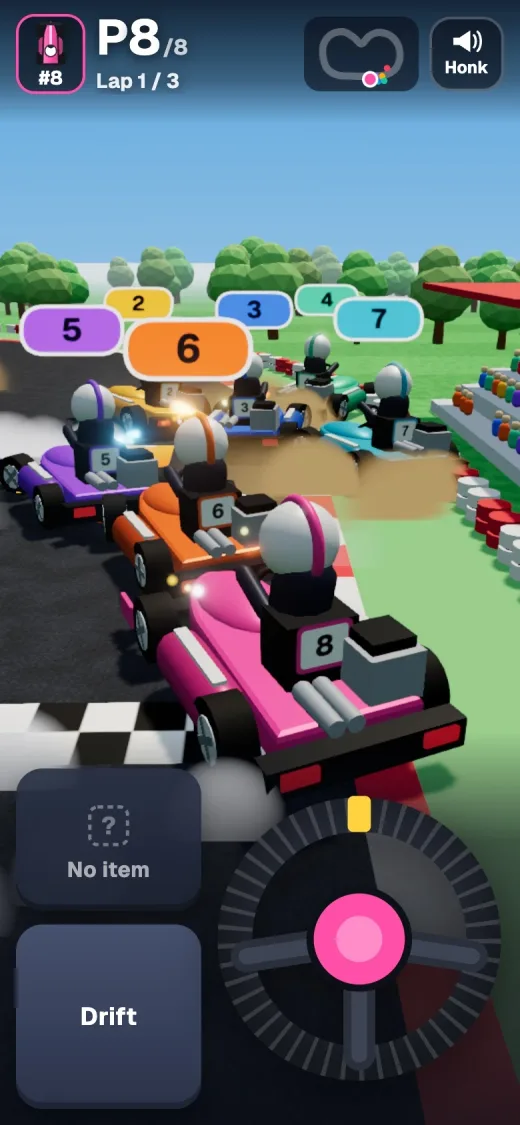
The phone of the player driving kart 8, at the same moment of the same test run.
Both pictures come from one test run with eight test players. A room is bigger than that, and three things about Kart Rally only mattered at full size.
A rehearsal that took 22 minutes
On 8 November, on a laptop, Studio rehearsed an early version with 3, then 30, then 300 test players. The rehearsal took 22 minutes and 40 seconds. With 3 and with 30 players the race ended, but the 300-player race never did.
So the rehearsal played its full ten minutes of game time, and playing them took most of those 22 minutes. The early rules built a physics world holding every kart on every step, with every kart able to bump into every other. A later version, with physics of its own, plays the same 300-player rehearsal in under a minute and a half, and its race ends.
Eight karts per phone
Kart Rally's rules send each phone only the karts near its own, eight at most. A test variant that sent every phone every kart showed why. At 300 players its rules took more than six times as long to answer, and each phone's update grew from under one kilobyte to nearly ten.
That is the full-room check in one game. What each phone is sent must not grow with the room.
Out of memory in production
On 10 November, publishing Kart Rally into a workspace failed three times in production. Each time the error read: "Durable Object's isolate exceeded its memory limit and was reset".
Cloudflare gives each isolate 128 MB of memory on every plan. Playing a heavy game makes a lot of short-lived garbage, and the app around the play left too little room for it.
So Decka moved every test play to a Worker of its own, then cut the garbage each play makes. None of the three would show in a quick test with a few players on a laptop.
Building a room game in Decka Studio
Studio builds a game for a room from a description. It works in four steps: "Answer any questions Studio asks", "Approve the plan", "Watch test players play it", and "Change anything, then run it with your room".
Every version is held to one rule: "Activities must pass Decka's checks before they can run, whichever AI builds them". A version that fails a check isn't saved, and the check says what went wrong, so Studio can fix it.
Everyone joins with a QR code, with no app to install. Studio activities run in PowerPoint and Decka decks, and in PowerPoint the Decka add-in puts one on a slide. Studio doesn't make games to publish on the web, in an app store or on Roblox.
Decka Studio's page shows how it works, with Kart Rally's films.
Vibe coding a room game with your own AI
If you already build with Claude or ChatGPT, you can keep doing that. Connect Decka to your AI app, and it builds the game with your app's tokens. The test players, the checks and the approval are the same as in Studio. The guide to building with your own AI sets it up.
FAQ
Common questions
Can you vibe code a multiplayer game?
Yes. The code is rarely the hard part. The testing is. A multiplayer game's bugs show up on phones you are not holding, with players you do not have. Test it at full size, with the six checks on this page, before a room plays it.
How do you test a multiplayer game without players?
Simulate them. For a small game, open a browser window for each player. For a big one, script players that join and press buttons, and raise their number until something slows down. Decka Studio does this on every version with its own test players.
Is vibe coding good for making games?
For a first playable version, yes, and quickly. Its weak spot is whatever you cannot see from one screen: other phones, the back row, a full room. Karpathy, who named it, judged it "not too bad for throwaway weekend projects", and a game for a room is not one.
Build a game for your own room
Describe it in your own words. Studio builds it with you: the phone screens, the big screen and the rules.
A bluffing game where everyone invents a fake answer, then votes for the real one